


Messenger
4.72.45M Reviews
App Specs
- Version
- 584.1.0.61.98
- Updated On
- License
- Free
- Downloads
- 5,000,000,000+
- Developer
- Meta Platforms, Inc.
- Categories
- Communication
- Platform
- Android, iOS
Screenshots
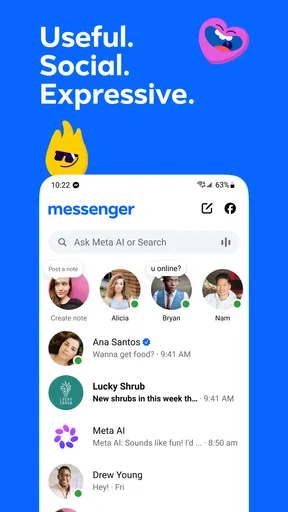



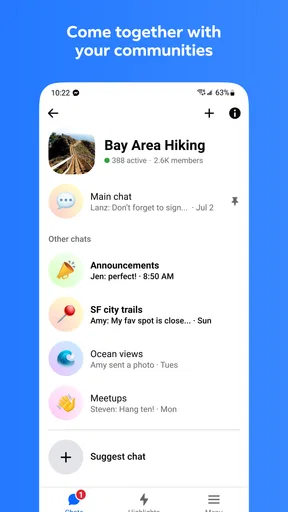



 Analysis by AppCompare
I usually judge a messaging app by what happens when a conversation gets slightly messy: someone misses a message, a call drops, or a group changes plans at the last minute. Messenger is useful in those moments because it brings everyday chats and calls into one place, especially when the people I want to reach already use it. It is a free communication app from Meta Platforms, Inc., and its familiar, social approach is both its biggest convenience and the reason it may not suit everyone.
Where users can get stuck
The easiest way to start is to install the app and sign in with an account you already use for Messenger. From there, I would first check whether the people you need to contact appear in your chats, rather than assuming that every contact on your phone will already be available in the same way. Messenger works best when the people around you have settled on using it; otherwise, you may still need another messaging app for some conversations.
A common point of confusion is the difference between having a conversation available and having notifications arrive at the right moment. If a reply seems late, I first look at the chat itself before concluding that the message failed. Then I check the phone’s connection and notification settings. A quiet or delayed alert does not necessarily mean the conversation has disappeared, and reopening the relevant chat is a simple way to see whether newer messages are there.
Guides and Analysis on Messenger
Calls add another layer of possible confusion. A voice or video call needs a working internet connection, and a call that struggles may be affected by the network at either end. I find it more helpful to test a short call before relying on one for an important conversation than to assume the app itself is broken. If a call is unstable, switching to a regular phone call may be the sensible fallback.
Setup checks that save time
After signing in, I recommend taking a moment to review notifications and choose what is useful for your routine. A busy group can generate more interruptions than a one-to-one chat, so muting a particularly active conversation can make the app easier to live with without requiring you to leave the group. I also check the phone’s own notification controls, since settings at the device level can affect what the app is allowed to show.
It is worth opening the app’s privacy and conversation controls before you need them. Messenger offers end-to-end encryption in secret conversations, but the original review’s important caveat still applies: it is not described there as the default for every chat. If privacy is central to a particular exchange, check the conversation’s available settings and make sure you understand which type of chat you are using. A disappearing-message option can be useful for a temporary exchange, but it is not a substitute for thinking carefully before sending sensitive material.
I would also avoid treating payment tools as a universal shortcut. The earlier version of this review described sending money through Facebook Pay, but payment features can depend on what is available to the people using the app. Before planning to split a bill that way, check that the option is present and usable for everyone involved. If it is not, agreeing on another payment method in advance prevents a simple dinner plan from turning into a long troubleshooting session.
Worth Reading Before You Choose

Google Calendar Makes a Crowded Week Easier to Manage

Baby Panda World Brings Quick Play to Modern Phones, but Its Game Library Feels Busy

ESPN’s Live Game View Makes Following Close Games Easier

QuizzLand Review: A Good Fit for Short Trivia Breaks, Not Every Player

Basketball Stars: Multiplayer Is Fast, but Can It Recover When Matches Go Wrong?

WEBTOON Turns Phone Updates Into a Better Reading Routine
Using Messenger day to day
I find Messenger easiest to judge by how it fits into the conversations I already have, rather than by how many tools it puts on screen. In this section, I’ll focus on the small choices that make everyday use smoother, from keeping a busy group manageable to deciding when a call is more useful than another string of messages. That practical routine also helps clarify when a different app may be the better fit.
Recovering a conversation when something goes wrong
If a message seems missing, I start with the least disruptive checks: confirm that I am looking at the intended conversation, refresh my understanding of the latest messages, and make sure the phone is online. I avoid immediately sending the same message several times, because that can create confusion if the first one eventually appears. When the app feels unresponsive, closing and reopening it is a reasonable basic step; if the issue persists, checking for an available app update is more useful than repeatedly tapping send.
For a call that will not connect, I try a different connection if one is readily available, then ask the other person to check theirs as well. That distinction matters: a problem at one end can look like an app-wide failure from the other. If text chat works but a call does not, I use text to agree on a backup plan instead of assuming that every part of the service is down.
Battery use is another practical consideration raised in the original review. If I am expecting a long video conversation while away from a charger, I plan accordingly and avoid treating any single app as the only way to reach me. That is not a reason to avoid Messenger altogether; it is a reminder that extended calls are a different use case from checking a few short messages.
When the app may not be the cause
Messaging problems are not always caused by the messaging app. A weak connection, device-level notification controls, or the other person’s availability can all affect what happens. I find it useful to separate the symptom from the suspected cause: are messages arriving but alerts are quiet, or is the conversation itself failing to update? Is text working while calls struggle? Those small checks help narrow down what to try without turning a routine glitch into a full reset of your setup.
Likewise, a person who cannot be reached in Messenger may simply prefer another service or may not be active there. If most of your family uses a different app, choosing Messenger just because it is familiar to you can add friction for everyone else. The most convenient choice is often the one your regular contacts will actually open, not the one with the longest feature list.
Who will get the most from it
Messenger makes sense for people who already have friends, relatives, or community groups using it and want a straightforward place for messages, voice calls, video chats, and group calls. A realistic example is organizing a weekend outing: I can use a group conversation to settle the time, share quick reactions with stickers or GIFs, and move to a call if typing becomes cumbersome. The benefit is less about any single tool and more about keeping those parts of the conversation together.
It may be a weaker fit if you want every contact on your phone to use one universal service, if your social circle is established elsewhere, or if you prefer a messaging experience with fewer social distractions. People who need strong privacy protections for every conversation should also compare the available options carefully rather than assuming that one encrypted mode covers all chats. In those cases, a service built around the priorities you care about, or simply the app your contacts already use, may be a better choice.
Compared with the usual alternatives, Messenger’s practical advantage is its combination of individual and group messaging with voice and video calling in a familiar social environment. A basic texting app can be simpler for people who only want direct messages, while another dedicated messaging service may be a better match for a group whose members have already chosen it. I would choose Messenger for reach within my existing circles, not because I expect it to replace every communication tool.
First Impressions
When you first fire up Messenger, it's like walking into a digital coffee shop. Everything feels familiar and intuitive. The interface is clean, and everything you need is just a tap away. It's not trying to dazzle you with flashy graphics or unnecessary features. It's straight to the point: connecting you with your friends and family.
Features Galore
One thing that really stands out is the variety of features Messenger offers. You're not just limited to texting. You've got voice calls, video chats, and even group calls. It’s like a Swiss army knife for communication! And let's not forget the quirky stuff – stickers, GIFs, and emojis that bring a little fun to your chats.
Another neat trick up Messenger's sleeve is the ability to send money. Yep, you heard that right! You can split the bill or pay your rent just like that. The integration with Facebook Pay makes it super seamless.
Performance and Usability
In terms of performance, Messenger is pretty solid. It's quick, messages are sent and received in a flash, and the call quality is usually crystal clear. Of course, it helps if you have a stable internet connection. Now, I did notice that it can be a bit of a battery hog, so that's something to keep an eye on, especially if you're planning a marathon chat session.
Usability-wise, everything feels smooth. Navigating through the app is a breeze, and I didn’t find myself lost in menus. Plus, the dark mode is a lifesaver for those late-night chats.
Security and Privacy
We can't talk about a messaging app without touching on security and privacy. Messenger offers end-to-end encryption, but only in secret conversations. It’s a bit of a bummer that it’s not the default for all chats, but at least it’s there if you need it. And hey, you can always set your messages to self-destruct if you’re feeling extra cautious!
Final Thoughts
So, is Messenger worth your time? I’d say yes, especially if you're already on Facebook. It’s a convenient way to keep in touch without juggling a bunch of different apps. Sure, it's not perfect, but it gets the job done, and it does it well. Plus, with all the new features they keep rolling out, it's only getting better.
Whether you’re catching up with friends or coordinating a group outing, Messenger has got you covered. So go ahead, give it a whirl and let me know what you think!
What to expect before installing
The app has been available since January 30, 2014, and its current version is 563.0.0.47.86. Its audience is broad: the age rating is Everyone, and the free download has in-app purchases ranging from five cents to $739.99 per item. That range is not a reason to expect that ordinary messaging requires a purchase, but it is sensible to review any purchase prompt before confirming it, especially if someone else uses your device.
Messenger’s reach is hard to overlook: it has more than five billion installs, a 4.7 average from around 112 million ratings, and about 2.5 million written reviews. Those figures suggest that it is a familiar option for many people, not that every user will have the same experience. I would still base the decision on whether my contacts are there, how I feel about its privacy choices, and whether the app’s mix of communication tools suits my habits.
A practical verdict
Messenger is at its best when it removes small bits of daily friction: replying to a friend, checking in with family, or gathering a group in one conversation. I would install it if the people I regularly talk with already use it and I value having messages and calls together. I would skip it, or keep it as a secondary option, if my contacts are elsewhere or if my main requirement is a privacy approach I want applied consistently across every conversation.
Pros
- User-friendly interface
- easy navigation.
- End-to-end encryption for secure chats.
- Seamless integration with Facebook contacts.
- Wide array of stickers and emojis.
- Voice and video call options available.
Cons
- Consumes significant battery power.
- Requires Facebook account for full features.
- Frequent updates can be intrusive.
- Privacy concerns due to data sharing.
- Limited customization options for themes.
FAQs for Messenger
What features does Messenger offer for communication?
Messenger provides a variety of communication features, including text messaging, voice calls, and video calls. Users can send photos, videos, and voice messages. It also supports group chats, reactions to messages, and the ability to share locations. Messenger Rooms allow video chat with up to 50 people, making it versatile for personal and group interactions.
Is Messenger secure and private?
Messenger offers several security features, including end-to-end encryption for some conversations through its Secret Conversations feature. However, not all chats are encrypted by default. Users can also use features like two-factor authentication and login alerts to enhance security. Privacy settings allow control over who can contact you and who sees your active status.
Do I need a Facebook account to use Messenger?
Originally, a Facebook account was required to use Messenger, but now users can sign up using just a phone number. This makes it accessible even for those who do not want to create a Facebook profile. However, linking to a Facebook account offers additional features like syncing contacts and accessing Facebook messages.
How does Messenger integrate with other apps and services?
Messenger integrates with various apps and services, allowing users to share Spotify tracks, start watch parties, or play games directly within the app. It also supports integration with Instagram, enabling cross-platform messaging. Additionally, businesses can use Messenger to interact with customers, providing customer service or sharing updates.
Are there any costs associated with using Messenger?
Messenger is free to download and use for sending messages and making calls over Wi-Fi. However, data charges may apply when using the app over a mobile network. Some features, like playing certain games or using third-party services within Messenger, might involve additional costs or in-app purchases.


